

Highlights
- 🚨 Service shutting down Feb 29, 2025
- Post-migration optimization for RedisGraph EOL includes advanced tools, multi-graph support, and improved maintenance practices.
- FalkorDB is a graph database that extends RedisGraph's technology, offering better performance, scalability, AI readiness, and Cypher compatibility, which is ideal for modern workloads.
- Post-Migration: FalkorDB supports optimization, scalability, and long-term maintenance with advanced tools and community resources.
Understanding the RedisGraph EOL
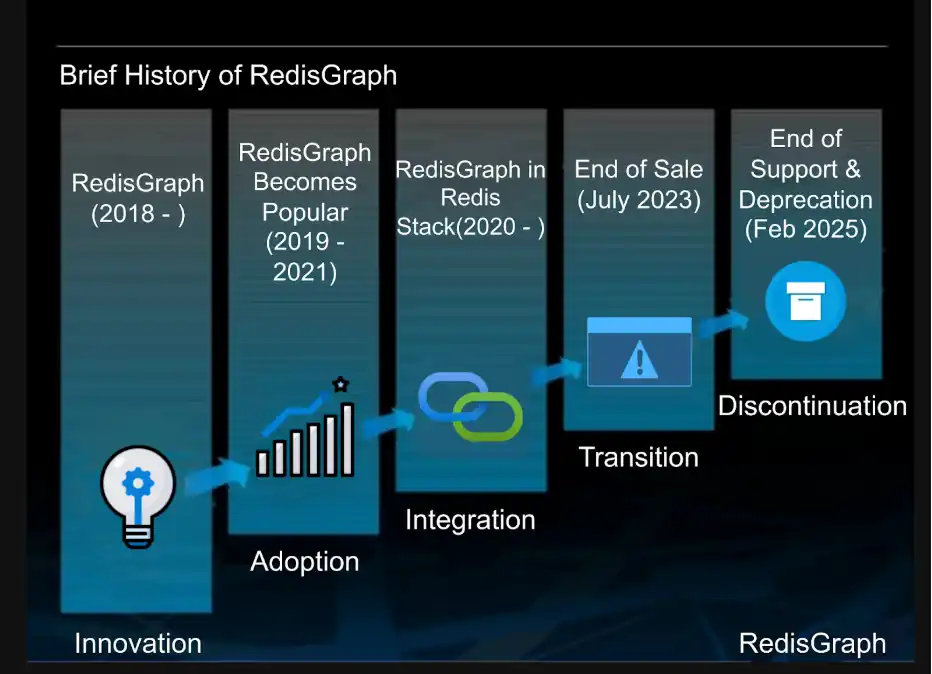
Introduced five years ago, RedisGraph transformed Redis into a general-purpose property graph database. Despite its initial promise and many technical advantages, Redis announced its end-of-life (EOL) on July 5, 2023. The decision to discontinue RedisGraph has stirred up much conversation within the industry.
Timeline and Key Dates

RedisGraph’s EOL process includes clearly defined phases and deadlines to ensure a smooth transition for users.
- License Availability: Starting July 5, 2023, new licenses for RedisGraph will no longer be available. Existing customers may renew subscriptions for on-premise or self-managed versions until January 31, 2024.
- Support Termination: Official support for RedisGraph will end on January 31, 2025. After this date, commands will be disabled on Redis Enterprise Cloud, and no further support will be provided across platforms.
- GitHub Repository: The RedisGraph GitHub repository will be in maintenance mode until December 31, 2024. Critical patches will be released as needed, and the repository will be tagged as “deprecated” on February 1, 2025.
- RedisStack: Version 7.2.x-y and later will no longer include RedisGraph capabilities.
RedisGraph users must plan their transition strategy based on the outlined deadlines. For customers relying on Redis Enterprise Software, versions beyond 6.4 should be avoided unless explicitly requested by Redis.
Evaluating FalkorDB as a Successor
As RedisGraph is phased out, FalkorDB emerges as a powerful successor, meeting the needs of modern graph databases and AI-driven applications.
FalkorDB is a direct successor to RedisGraph and continues its legacy of high performance. Designed to meet the changing needs of real-time knowledge retrieval and GraphRAG, it provides a seamless transition for teams already familiar with RedisGraph.
It is an attractive option for teams seeking to migrate to a solution focused on artificial intelligence (AI)-driven applications. FalkorDB offers a range of impressive features:
- Performance Excellence: Demonstrated through benchmarks, FalkorDB processes queries with 99th percentile of requests under 83ms. This performance outperforms other graph databases, such as Neo4j, by significant margins.
- Efficient Resource Utilization: FalkorDB ensures predictable performance across varying loads, reducing operational costs with lower infrastructure requirements.
- Scalability: FalkorDB supports horizontal scaling and a multi-graph architecture, capable of handling 10K+ tenants per instance. That means it can be expanded without much issue for larger datasets, higher traffic, and enterprise workload. Therefore, it suits Software-as-a-Service (SaaS) applications and complex use cases.
- Integration Capabilities: Offers compatibility with major programming languages, Cypher query language, and Redis persistence mechanisms.
- Built-in AI Readiness: Optimized for AI-driven systems with features like GraphRAG support for retrieval-augmented generation (RAG).
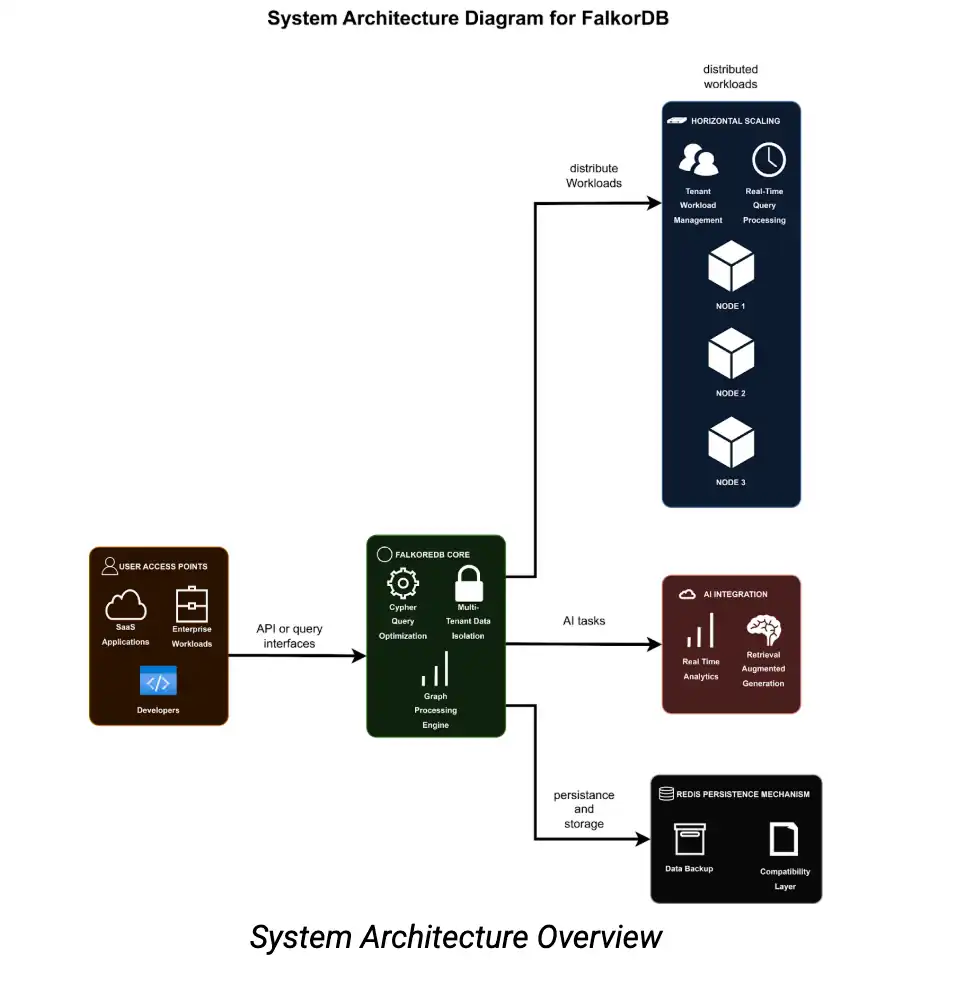
FalkorDB maintains backward compatibility with Cypher queries, supporting key features like graph traversal, pattern matching, and filtering, making it easier for existing RedisGraph users to adapt.
It also integrates Redis’ persistence mechanisms, allowing users to leverage their existing data storage setups without significant restructuring. This compatibility minimizes migration efforts and provides continuity for applications reliant on RedisGraph.
Comparing FalkorDB and RedisGraph
Speed
FalkorDB continues to enhance its engine, resulting in even lower latency and improved performance compared to RedisGraph.
Scalability
FalkorDB supports horizontal scaling, allowing it to handle increased workloads efficiently.
Reliability
RedisGraph had known limitations that FalkorDB fixed and improved upon to increase the production-readiness of its solution.
FalkorDB outperforms RedisGraph in query capabilities and data modeling with optimized query execution, native multi-tenancy support, flexible graph schemas, and AI integration through GraphRAG.
It offers a range of advanced algorithms for real-time analysis and efficient handling of complex queries, making it suitable for demanding applications.
Migration Strategy: From RedisGraph to FalkorDB
The migration process includes setting up the environment, exporting data from RedisGraph, importing it into FalkorDB, and verifying data integrity.
Both platforms use Docker for deployment, ensuring consistency and portability. This guide outlines the prerequisites, migration steps, and validation to ensure your graph data is ready for use with FalkorDB.
Requirements and Resources
The following system requirements and tools are necessary:
- System:Linux, Windows (or Docker-compatible OS)
- Tools: Docker Desktop, Redis CLI
- Images: redislabs/redisgraph, falkordb/falkordb
The following resources are available:
- FalkorDB Official Documentation: Step-by-step guide for setup and migration with examples and troubleshooting.
- FalkorDB GitHub repository: Community discussions and solutions for migration challenges.
- Docker Documentation: Guides on configuring and managing Docker containers.
Preparing for Migration
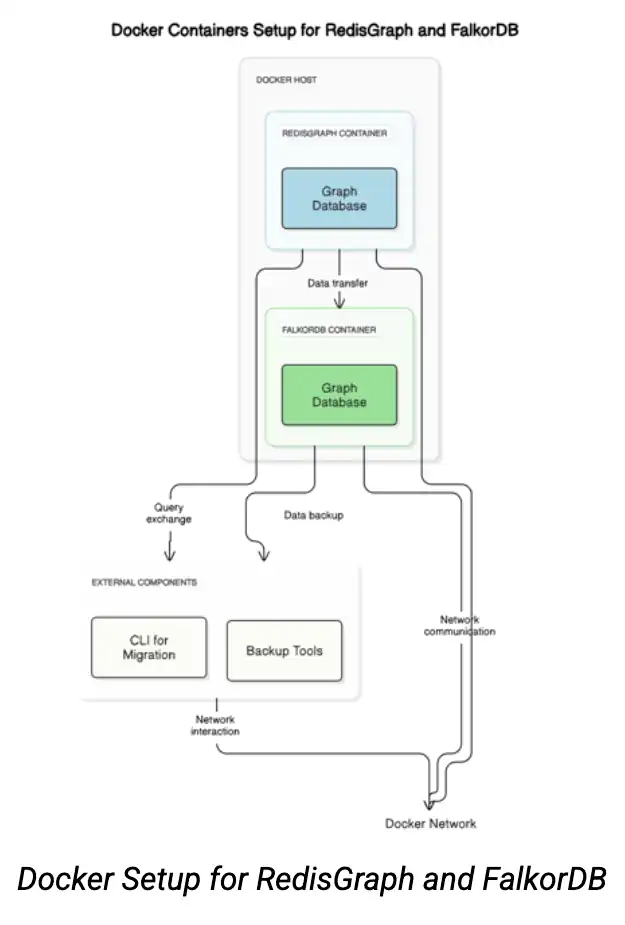
Install Docker
The first step is to ensure Docker is installed and running on your system.
docker --version
Set Up RedisGraph
We’ll need to pull the RedisGraph Docker container and start it with the following command:
					docker run -d --name myredisgraph -p 6379:6379 redislabs/redisgraph
docker ps

Verify by adding graph data via Redis CLI
Start Redis CLI in myredisgraph.
docker exec -it myredisgraph redis-cli
We’ll start by representing something really simple: Writer wrote the book.
					GRAPH.QUERY library "CREATE (w:Writer {writer_id: 1, writer_name: 'Author Name'})"
GRAPH.QUERY library "CREATE (b:Book {book_id: 101, book_title: 'Book Title'})"
GRAPH.QUERY library "MATCH (w:Writer {writer_id: 1}), (b:Book {book_id: 101}) CREATE (w)-[:WROTE]->(b)
Test the Data
GRAPH.QUERY library "MATCH (w:Writer)-[:WROTE]->(b:Book) RETURN w.writer_name, b.book_title”

These queries display the relationships between nodes, so you can confirm that the data has been added correctly.
Executing the Migration Process
Now that your RedisGraph instance is set up and populated with data, it’s time to export that data and load it into FalkorDB.
Export RedisGraph Data
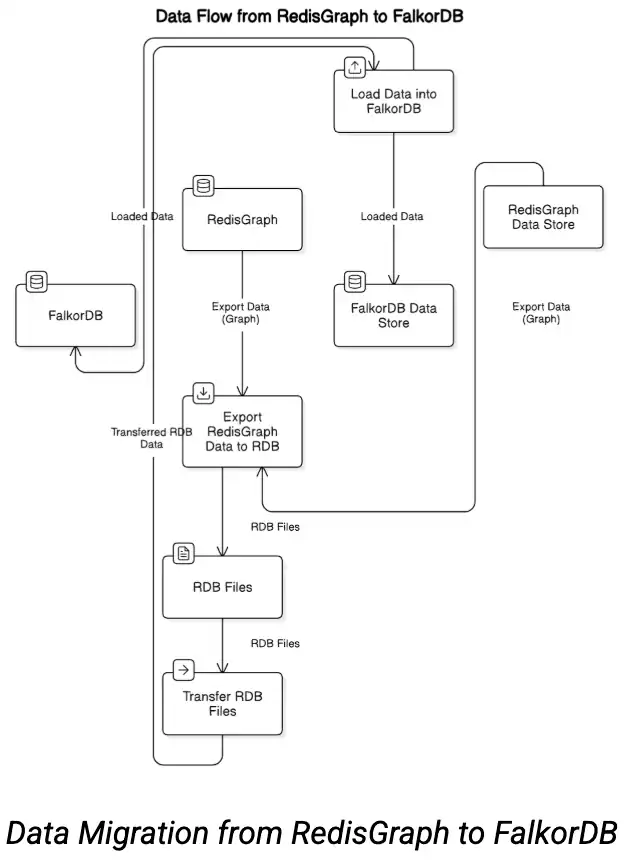
To create a snapshot of the data and save it in an RDB file, which is the format used by Redis for persistent storage, use this command:
docker exec -it myredisgraph redis-cli SAVE
The following command saves the RDB file (dump.rdb) to your current directory:
docker cp myredisgraph:/data/dump.rdb ./dump.rdb
Import into FalkorDB
Set up FalkorDB as your target environment.
docker run -d --name falkordb-staging -p 6380:6379 -v ${pwd}:/data -e REDIS_ARGS="--dir /data --dbfilename dump.rdb" falkordb/falkordb
Testing and Validation
To interact with FalkorDB, open the Redis CLI inside the FalkorDB container:
docker exec -it falkordb-staging redis-cli -p 6379
To confirm that the migration was successful, run a few queries in FalkorDB:
					GRAPH.QUERY library "MATCH (n) RETURN n LIMIT 1"
GRAPH.QUERY library "MATCH (w:Writer)-[:WROTE]->(b:Book) RETURN w.writer_name, b.book_title"
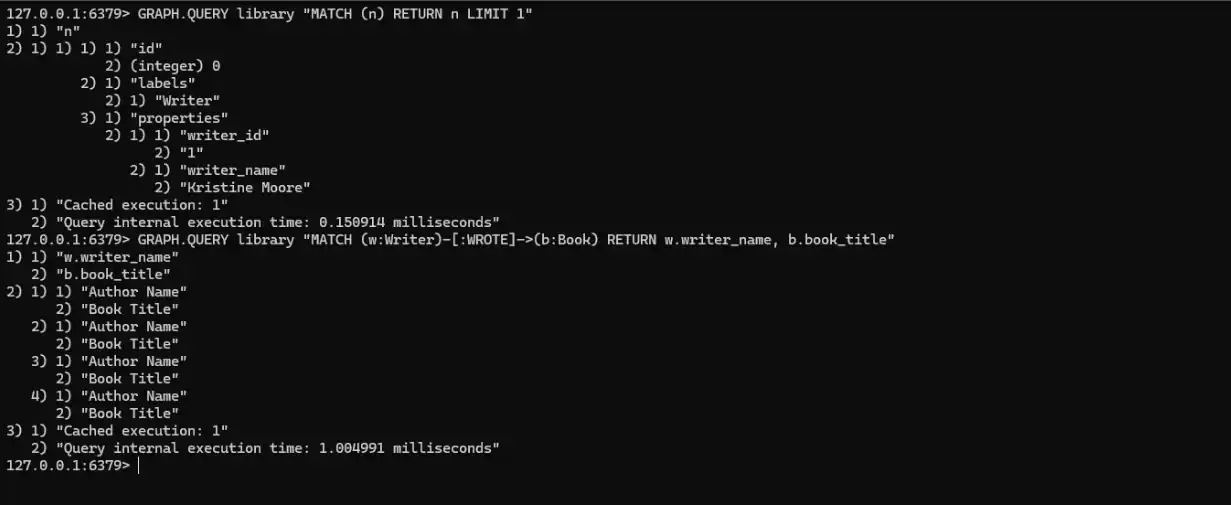
These queries should return the same results as they did in RedisGraph.
Best Practices for Ensuring Data Integrity and Consistency
When we migrate the data, we made sure to follow several best practices to ensure everything went smoothly and the data remained consistent:
1. Performing a Dry Run in a Staging Environment
We performed a dry run of the migration in a staging environment. This allowed us to catch any potential issues early, ensuring the process wouldn’t disrupt production. Testing in staging could address problems without affecting our live data.
2. Running Validation Queries Post-Migration
We ran validation queries to check the integrity of the data. When dealing with large datasets, we should focus on the following strategies to ensure the nodes and relationships remain intact:
- Automated Validation Tools: Utilize automated tools to quickly identify anomalies and inconsistencies in large graph datasets, streamlining the validation process.
- Data Sampling: Perform validation on a representative sample of the data to ensure accuracy without the need to check every record.
- Incremental Validation: Validate data in stages, focusing on smaller subsets to manage complexity and ensure thoroughness.
3. Planning Downtime for Migration
We can plan for downtime during the migration by accounting for potential delays caused by the data volume and complexity. We will ensure enough time is allocated to handle any unexpected issues, particularly in the production environment. By scheduling this downtime in advance, we can minimize disruptions to users.
4. Ensuring Functional Integrity
The next step is ensuring the system operates as intended in the new environment. This involves simulating typical use cases to confirm that the migrated data integrates seamlessly with existing workflows.
For instance, adding new nodes or relationships in FalkorDB and querying them tests the system’s ability to handle updates and retrieve information accurately. Running these tests demonstrates not only the migration’s success but also the system’s readiness to support real-world operations.
					GRAPH.QUERY library "CREATE (w:Writer {writer_id: 2, writer_name: 'Author B'})"
GRAPH.QUERY library "MATCH (w:Writer {writer_id: 2}) RETURN w"
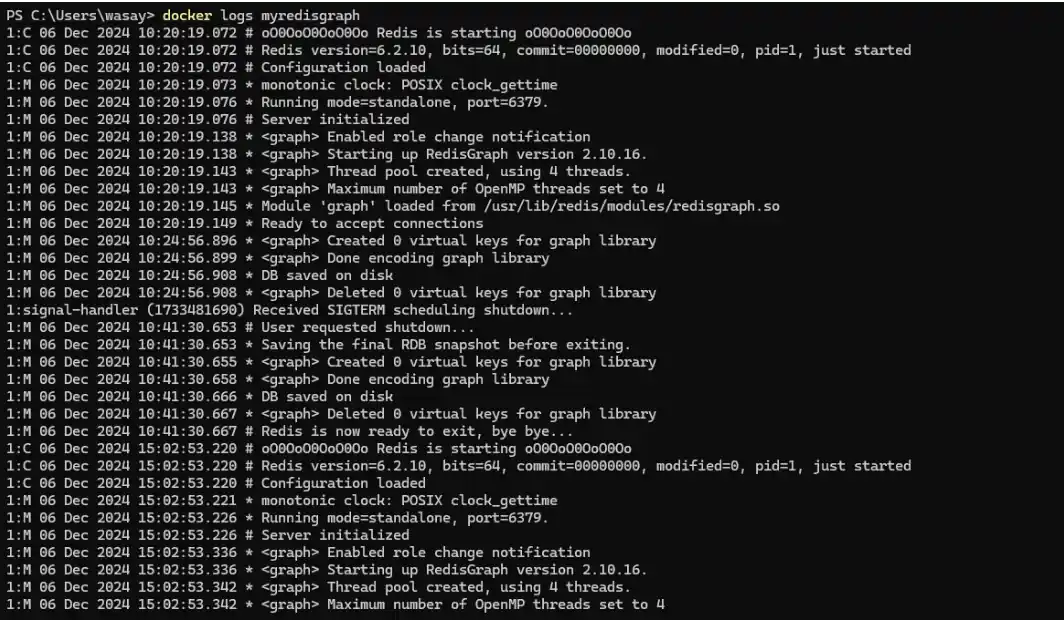
Additionally, check the system logs to ensure there are no errors:
docker logs myredisgraph
docker logs falkordb-staging
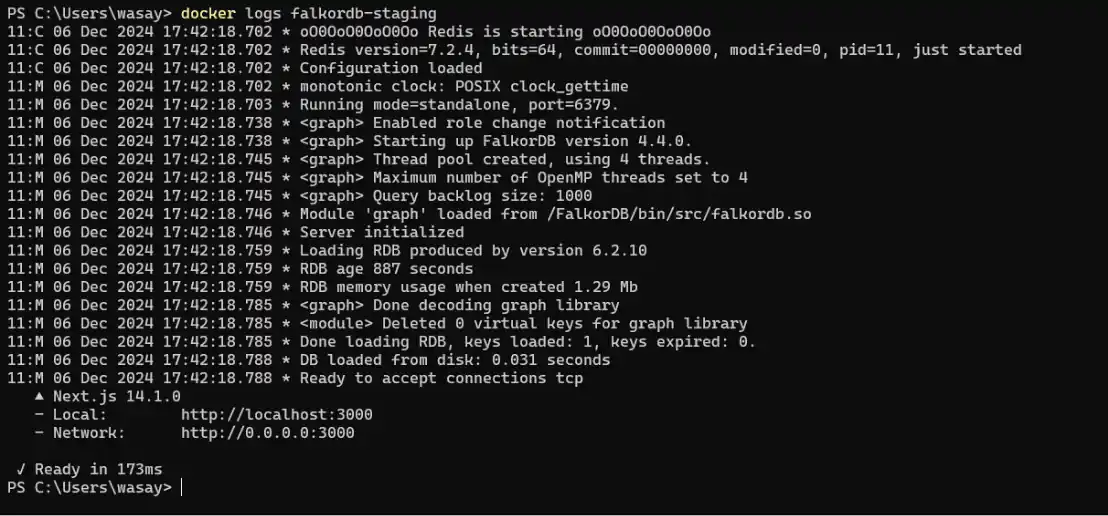
The logs show that both Redis instances, myredisgraph and falkordb-staging, start successfully. myredisgraph runs Redis 6.2.10 with RedisGraph 2.10.16, enabling the graph library with four threads and periodic saves without errors.
falkordb-staging uses Redis 7.2.4 with FalkorDB 4.4.0, loads an RDB file, and creates a thread pool with a backlog of 1000. Both instances are operational and ready to accept connections.
5. Creating a Backup of the Final State
Once we’ve validated the migration and confirmed that FalkorDB is functioning as expected, the next step is to secure the current state of the data in FalkorDB. Backing up the FalkorDB data ensures you have a reliable copy to revert to should any issues arise later.
To save the current FalkorDB state, execute the following command:
					docker exec -it falkordb-staging redis-cli SAVE
docker cp falkordb-staging:/data/dump.rdb ./falkor-staging-backup.rdb

With this backup in place, you now have a secure fallback option for the FalkorDB state.
Post-Migration Considerations
Maintaining continuity, security, and disaster recovery ensures system stability. Regular monitoring ensures data integrity, while a solid backup strategy and security measures protect against failures and unauthorized access. These practices minimize risks and lay the groundwork for optimizing FalkorDB for your workloads.
Optimizing FalkorDB for Your Workloads
FalkorDB is designed for scalability, security, and high performance. To optimize FalkorDB for your workloads:
Benchmarking
Use the FalkorDB benchmark tool to measure query response times, throughput, and memory utilization under real-world conditions. This tool simulates concurrent queries and updates, helping you evaluate performance and make necessary adjustments. Redis also offers the Redis-benchmark utility, which tests performance with customizable options for clients, requests, and pipelining. This ensures accurate results, especially for remote Redis servers.
Fine-tuning
Adjust parameters like memory allocation, thread pool size, and backup frequency post-migration for optimal performance. Use the following Docker command for real-time configuration changes:
docker exec -it falkordb-staging redis-cli CONFIG SET <parameter> <value>
FalkorDB-Cloud Features
FalkorDB-Cloud enhances scalability and security by supporting cluster deployment on the Google Cloud Platform (GCP). This enables:
- Multi-Graph and Multi-Tenant Capabilities:
- Applications can manage multiple isolated graphs without compromising performance or security.
- The multi-tenant architecture isolates data for each tenant while ensuring high security and performance.
- Developer Tools: Developers can manage multiple graphs using Python and TypeScript clients, making it easier to query and handle diverse data sets. The following Python code demonstrates how to query multiple graphs:
					Python

from falkordb import FalkorDB
fdb = FalkorDB(host='localhost', port=6379)
tenant_1_graph = fdb.select_graph('tenant1_graph')
tenant_2_graph = fdb.select_graph('tenant2_graph')
result_tenant_1 = tenant_1_graph.query("MATCH (n) RETURN n")
result_tenant_2 = tenant_2_graph.query("MATCH (n) RETURN n")
Performance Improvements
FalkorDB incorporates several mechanisms to optimize performance:
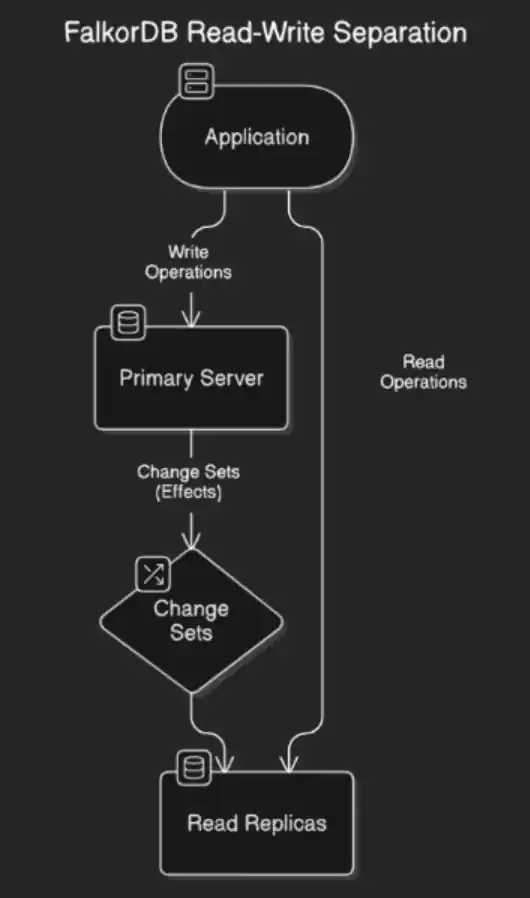
- Read-Write Separation:
- Read replicas handle queries while write operations are directed to the primary server. This setup allows independent scaling of read-heavy and write-heavy workloads, ensuring they don’t interfere with each other.
- Efficient Replication Model:
- FalkorDB’s replication model reduces the load on replicas by sending only change sets (effects) rather than full queries. This improves efficiency and synchronization.
Long-Term Maintenance and Support
FalkorDB provides a variety of community-driven resources to assist users with troubleshooting and best practices:
- Community Platforms, such as Discord, and YouTube offer spaces for discussions, updates, tutorials, and advanced use cases.
- The official documentation and blog provide step-by-step guides covering topics from setup to multi-agent systems.
- The FalkorDB forum is available for updates, discussions, and announcements, keeping users informed and engaged within the community.
Getting Started
FalkorDB emerges as a natural choice to RedisGraph, seamlessly aligning with current and future trends in graph database technology. Its advanced features make it a forward-thinking solution, positioning it as a reliable platform for organizations to harness the full potential of graph-based data.
FalkorDB is a high-performance, scalable graph database that efficiently handles large datasets and high-velocity data streams. It frictionlessly integrates with AI and ML, leveraging GraphRAG to improve data accuracy, enhance interpretation, and reduce AI hallucinations. Through its GraphRAG SDK, developers can build graph-based AI/ML applications.
By supporting vector indexing, full text search, and major languages, FalkorDB ensures easy integration with existing systems and simplifies complex query management. Its scalable architecture and AI optimized features make it a powerful tools to build data-driven applications.
How do I migrate from RedisGraph to FalkorDB?
How does FalkorDB handle high availability and fault tolerance during migration?
Why switch after RedisGraph's end of life?
How does FalkorDB's multi-tenant architecture impact my graph data management?
How does FalkorDB integrate with Large Language Models (LLMs) for advanced applications?
A powerful open‐source graph database
FalkorDB is an open‐source graph database management system engineered to manage connected data and intricate relationships. By representing data as interconnected nodes and edges, it facilitates efficient storage and rapid retrieval.
