
Frequently Asked Questions

Migration from Relational to Graph Database

Why should I migrate from a relational database to a graph database?

Graph databases like FalkorDB excel at handling complex, interconnected data, offering better scalability and query performance for AI/ML applications, real-time analytics, and relationship-based queries. They eliminate the need for costly joins and enable real-time exploration of relationships, making them ideal for dynamic and evolving datasets. [Source]

What are the main steps in migrating from a relational to a graph database?

The migration process involves: 1) Analyzing your relational schema, 2) Designing the graph model (mapping entities to nodes and relationships to edges), 3) Extracting and transforming data, 4) Loading data into the graph database, 5) Validating the graph, 6) Optimizing the graph model, and 7) Updating your applications to use the graph database. [Source]

How do relational and graph databases differ in modeling data?

Relational databases organize data into tables with rows and columns, using primary and foreign keys for relationships. Graph databases represent entities as nodes and relationships as edges, allowing direct traversal and querying of complex connections without costly joins. [Source]

What tools and libraries are needed to migrate data to FalkorDB?

You can install FalkorDB using Docker and use the Python client library (pip install falkordb) for data transformation and insertion. The FalkorDB Browser and import tools are also available for visualization and bulk loading. [Source]

How do I transform relational data for insertion into FalkorDB?

After extracting your schema and data, you transform tables and relationships into Cypher CREATE queries. Nodes represent entities, and edges represent relationships. The process can be automated using Python scripts and FalkorDB's client library. [Source]

How can I verify that my migration to FalkorDB was successful?

After loading your data, you can use Cypher queries such as MATCH (n)-[r]->(m) RETURN n, r, m to visualize the graph, count nodes, and check relationships. The FalkorDB Browser provides a graphical interface for further validation. [Source]

What are best practices for optimizing my graph model after migration?

Best practices include indexing frequently queried nodes or relationships, optimizing traversal patterns, and refining your graph schema to match your application's needs. FalkorDB's documentation provides guidance on indexing and performance tuning. [Indexing Guide]

How can I scale FalkorDB for large or growing datasets?

For extensive or rapidly growing data, FalkorDB supports cluster deployments for horizontal scaling, live replication, and high availability. You can set up a cluster using Docker or opt for FalkorDB Cloud for a managed solution. [Cluster Guide]

Can I customize the data transformation process during migration?

Yes, you can adapt your migration scripts to handle complex data transformations, such as extracting JSON properties into separate nodes or edges, to fully leverage the flexibility of the graph model. [Source]

What are the benefits of using FalkorDB for AI and ML workflows?

FalkorDB offers ultra-low latency, native support for advanced graph algorithms, and vector indexing, making it ideal for AI applications like GraphRAG, agentic AI, and multi-hop reasoning. These features enable faster, more scalable, and explainable AI/ML workflows. [Source]

How does FalkorDB support visualization of migrated data?

FalkorDB provides a browser-based visualization tool that allows you to explore your graph data interactively after migration. You can run Cypher queries and visually inspect nodes and relationships. [FalkorDB Browser]

What programming languages and APIs does FalkorDB support for migration?

FalkorDB offers a Python client library and supports Cypher query language for data manipulation. Comprehensive API references and guides are available in the official documentation. [Documentation]

How do I handle foreign key relationships during migration?

Foreign key relationships in relational databases are mapped to edges in the graph model. During migration, you extract these relationships and create corresponding edges using Cypher queries in FalkorDB. [Source]

What is the recommended way to load large datasets into FalkorDB?

For large datasets, use FalkorDB's bulk loader tools and cluster deployment options to ensure efficient data ingestion and high availability. Refer to the official documentation for step-by-step instructions. [Bulk Loader]

How do I update my applications to use FalkorDB after migration?

After migration, modify your application's data access layer to use the Cypher query language and FalkorDB's APIs. Ensure all workflows are tested and functioning correctly with the new graph database backend. [Cypher Guide]

What are some common challenges when migrating to a graph database?

Common challenges include mapping complex relational schemas to graph models, handling data transformation, and optimizing for performance. FalkorDB's documentation and community resources provide guidance and best practices to address these issues. [Documentation]

How does FalkorDB compare to other graph databases for migration projects?

FalkorDB offers ultra-low latency, native support for advanced graph algorithms, and vector indexing, making it ideal for AI applications and real-time analytics. It outperforms competitors like Neo4j in latency and memory efficiency. See benchmarks at benchmark.falkordb.com.

Who can benefit from migrating to FalkorDB?

Organizations with complex, interconnected data—such as those in AI/ML, security, healthcare, and financial services—can benefit from migrating to FalkorDB. It is especially valuable for teams building real-time analytics, agentic AI, and recommendation systems. [Case Studies]

What is the typical implementation time for FalkorDB?

FalkorDB is built for rapid deployment, enabling teams to go from concept to enterprise-grade solutions in weeks, not months. This accelerates time-to-market for new applications. [Source]

Features & Capabilities

What are the key features of FalkorDB?

FalkorDB offers ultra-low latency, high memory efficiency, support for over 10,000 multi-graphs, flexible horizontal scaling, advanced AI integration (GraphRAG, agent memory), open-source licensing, and built-in multi-tenancy. [Source]

Does FalkorDB support advanced AI and machine learning use cases?

Yes, FalkorDB is optimized for AI use cases such as GraphRAG, agent memory, and agentic AI applications. It enables intelligent agents and chatbots with real-time adaptability and combines graph traversal with vector search for personalized experiences. [Source]

What integrations does FalkorDB offer?

FalkorDB integrates with frameworks such as Graphiti (by ZEP), g.v() for visualization, Cognee for AI agent memory, LangChain, and LlamaIndex for LLM integration. These integrations enhance AI, visualization, and knowledge graph capabilities. [Integrations]

Is FalkorDB open source?

Yes, FalkorDB is open source, encouraging community collaboration and transparency. This differentiates it from proprietary solutions like AWS Neptune. [Source]

Does FalkorDB support multi-tenancy?

Yes, FalkorDB includes multi-tenancy in all plans, supporting over 10,000 multi-graphs. This is especially valuable for SaaS providers and organizations with diverse user bases. [Source]

What programming languages and query languages does FalkorDB support?

FalkorDB supports the Cypher query language and provides a Python client library for programmatic access. [Documentation]

What are the performance metrics of FalkorDB?

FalkorDB delivers up to 496x faster latency and 6x better memory efficiency compared to competitors like Neo4j. It supports real-time data analysis and interactive dashboards. [Benchmarks]

Does FalkorDB provide an API?

Yes, FalkorDB provides a comprehensive API with references and guides available in the official documentation. [API Docs]

What technical documentation is available for FalkorDB?

FalkorDB offers comprehensive technical documentation, including setup guides, API references, and advanced configuration instructions. Documentation is available at docs.falkordb.com and release notes at GitHub Releases.

Pricing & Plans

What pricing plans does FalkorDB offer?

FalkorDB offers four pricing plans: FREE (for MVPs with community support), STARTUP (from /1GB/month, includes TLS and automated backups), PRO (from 0/8GB/month, includes cluster deployment and high availability), and ENTERPRISE (custom pricing with VPC, custom backups, and 24/7 support). [Pricing]

What features are included in the FREE plan?

The FREE plan is designed for building a powerful MVP and includes community support. [Pricing]

What features are included in the STARTUP plan?

The STARTUP plan starts from /1GB/month and includes TLS encryption and automated backups. [Pricing]

What features are included in the PRO plan?

The PRO plan starts from 0/8GB/month and includes advanced features like cluster deployment and high availability. [Pricing]

What features are included in the ENTERPRISE plan?

The ENTERPRISE plan offers tailored pricing and includes enterprise-grade features such as VPC, custom backups, and 24/7 support. [Pricing]

Competition & Comparison

How does FalkorDB compare to Neo4j?

FalkorDB offers up to 496x faster latency, 6x better memory efficiency, flexible horizontal scaling, and includes multi-tenancy in all plans. Neo4j uses an on-disk storage model and offers multi-tenancy only in premium plans. [Comparison]

How does FalkorDB compare to AWS Neptune?

FalkorDB is open source, supports multi-tenancy, and offers better latency performance and memory efficiency compared to AWS Neptune, which is proprietary and lacks multi-tenancy support. [Comparison]

How does FalkorDB compare to TigerGraph and ArangoDB?

FalkorDB provides faster latency, more efficient memory usage, and flexible horizontal scaling compared to TigerGraph and ArangoDB, which have limited horizontal scaling and moderate memory efficiency. [Source]

Why choose FalkorDB over other graph databases?

FalkorDB stands out for its superior performance, scalability, advanced AI integration, open-source licensing, built-in multi-tenancy, and proven success in demanding use cases. [Source]

Use Cases & Benefits

What are the primary use cases for FalkorDB?

FalkorDB is used for Text2SQL, security graphs (CNAPP, CSPM, CIEM), GraphRAG, agentic AI and chatbots, fraud detection, and high-performance graph storage for complex relationships. [Use Cases]

What business impact can customers expect from using FalkorDB?

Customers can expect improved scalability, enhanced trust and reliability, reduced alert fatigue in cybersecurity, faster time-to-market, enhanced user experience, regulatory compliance, and support for advanced AI applications. [Business Impact]

What pain points does FalkorDB address?

FalkorDB addresses trust and reliability in LLM-based applications, scalability and data management, alert fatigue in cybersecurity, performance limitations of competitors, interactive data analysis, regulatory compliance, and agentic AI development. [Pain Points]

Who is the target audience for FalkorDB?

FalkorDB is designed for developers, data scientists, engineers, and security analysts in enterprises, SaaS providers, and organizations managing complex, interconnected data in real-time or interactive environments. [Source]

Security & Compliance

Is FalkorDB SOC 2 Type II compliant?

Yes, FalkorDB is SOC 2 Type II compliant, meeting rigorous standards for security, availability, processing integrity, confidentiality, and privacy. [Compliance]

What security features does FalkorDB provide?

FalkorDB provides robust security features, including protection against unauthorized access, operational availability, accurate data processing, confidentiality safeguards, and privacy compliance. [Compliance]

Customer Success & Case Studies

Can you share specific case studies of customers using FalkorDB?

Yes, AdaptX uses FalkorDB for clinical data analysis, XR.Voyage for immersive experience platforms, and Virtuous AI for ethical AI development. Read their stories at FalkorDB Case Studies.

What industries are represented in FalkorDB's case studies?

Industries include healthcare (AdaptX), media and entertainment (XR.Voyage), and artificial intelligence/ethical AI development (Virtuous AI). [Case Studies]

What feedback have customers given about FalkorDB's ease of use?

Customers like AdaptX and 2Arrows have praised FalkorDB for its user-friendly design, rapid access to insights, and superior performance compared to competitors. [AdaptX Case Study]

Support & Implementation

How easy is it to get started with FalkorDB?

Getting started is straightforward: sign up for FalkorDB Cloud, launch a free instance, run locally with Docker, or schedule a demo. Comprehensive documentation and community support are available. [Get Started]

What support and training resources are available for FalkorDB?

FalkorDB offers documentation, community support via Discord and GitHub, solution architects for tailored advice, and onboarding options such as free trials and demos. [Documentation]

Migrate from Relational Database to Graph Database

Easily migrate from a relational database to a GraphDB

Highlights

How to Migrate from Relational Database to Graph Database

Graph databases have become a cornerstone of modern AI and ML applications, powering breakthroughs in areas like Retrieval-Augmented Generation (GraphRAG), recommendation systems, and semantic search.

Unlike traditional relational databases, graph databases are designed to model complex relationships and interconnected data with unparalleled efficiency. They excel in scenarios where the rigid schemas of relational databases pose limitations, offering the flexibility and explainability required to handle dynamic and evolving data sets effectively. Modern graph databases, such as FalkorDB, are equipped with native support for advanced graph algorithms and vector indexing, making them a natural fit for developing agentic AI systems and multi-hop reasoning applications.

If your data currently lives in a relational database and you’d like to build AI applications that rely on dynamic, interconnected data, now’s the time to migrate to a graph database.

This guide will walk you through the migration process step-by-step, showing you how to transition seamlessly from any relational database to FalkorDB, an ultra-low latency graph database designed for building AI applications.

By the end, you’ll be equipped to harness the full power of graph technology and AI for even the most complex and demanding use cases.

Understanding the Migration Approach

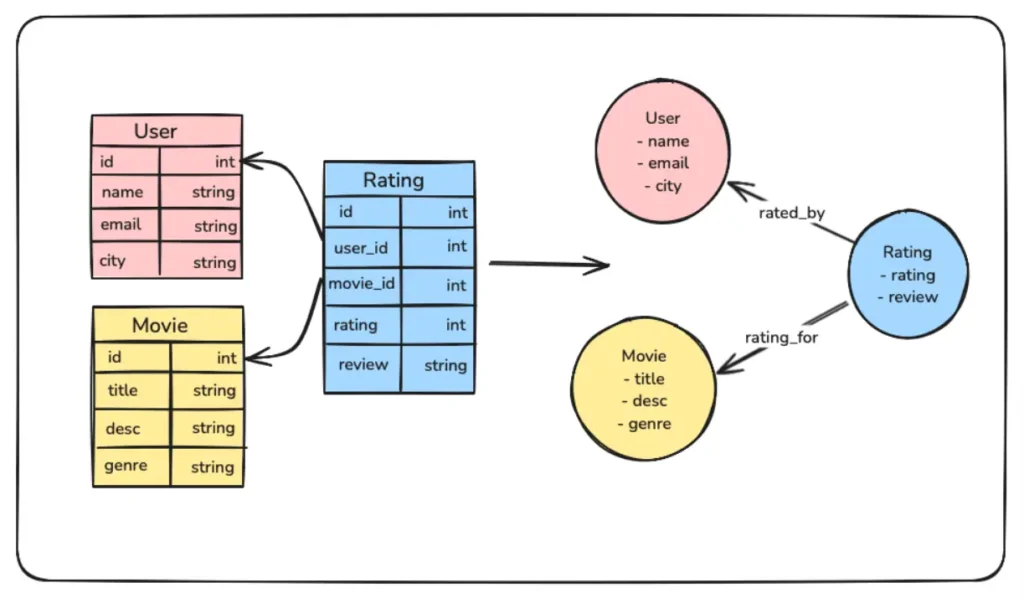
Before we dive in, let’s quickly compare how relational databases and graph databases model data. Relational databases organize information into rigid, predefined tables with rows and columns, using primary and foreign keys to define relationships. While this works well for structured, tabular data, it starts to falter when handling deeply interconnected datasets, as joins can quickly become cumbersome and computationally expensive.
How to Migrate from Relational Database to Graph Database
Fig. 1. Simple data transformation of relational data to graph data

Graph databases, on the other hand, take a completely different approach. They store Knowledge Graphs that naturally represent entities as nodes and relationships as edges within a graph structure. This allows you to traverse and query complex connections directly, eliminating the need for costly joins and enabling real-time exploration of relationships. 

Migrating from a relational database to a graph database involves more than just copying data—it’s a shift in mindset. You’ll need to transition from a table-centric model to one that revolves around entities (nodes) and their relationships (edges). The process includes analyzing your relational schema, mapping tables and join keys to nodes and edges, and transforming your data into a graph-compatible format ready for insertion.

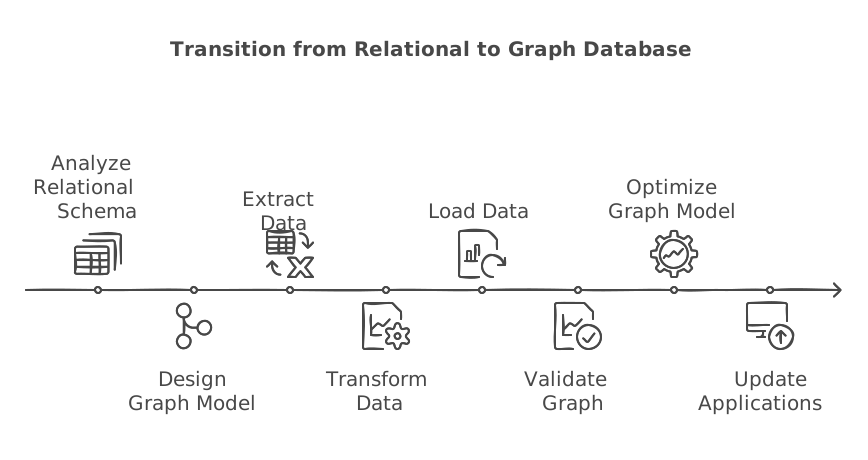
High-Level Steps for Migration

  1. Analyze the Relational Schema: Begin by understanding your current relational database schema. Identify key tables that represent entities and the relationships between them using primary and foreign keys.
  2. Design the Graph Model: Map entities to nodes and relationships to edges. Determine which attributes of your tables should be properties of nodes or edges to best represent your data in the graph.
  3. Extract Data from the Relational Database: Export the relevant tables and relationships from your relational database in a format such as CSV or JSON.
  4. Transform Data for the Graph Database: Transform the extracted data to match your graph model. Ensure that nodes and relationships are formatted into Cypher CREATE queries, so they can be inserted into the graph database easily.
  5. Load Data into the Graph Database: Use a script or import tools provided by your graph database to insert the transformed data into the database.
  6. Validate the Graph: Verify that the data has been correctly imported. Check node and relationship counts, and run sample queries to ensure that the graph behaves as expected.
  7. Optimize the Graph Model: Refine your graph by indexing frequently queried nodes or relationships and optimizing traversal patterns to enhance performance.
  8. Update the Applications: Modify your application’s data access layer to query the graph database using Cypher query language and ensure all workflows are functioning correctly.
Migrate from Relational Database to Graph Database

Steps to Migrate from a Relational Database to a Graph Database

Now, let’s start with the actual implementation. For simplicity, we’ll use a SQLite database to demonstrate the process, but the same approach can be applied to any other database technology.

Step 1: Install FalkorDB and the Required Libraries

First, let’s install FalkorDB using Docker, and keep it ready. 

				
					docker run -p 6379:6379 -p 3000:3000 -it -v ./data:/data falkordb/falkordb


You can visit http://localhost:3000 to launch the FalkorDB Browser and visualize the inserted data later. 

Additionally, you’ll need to install the Python client for FalkorDB. Start by setting up a virtual environment, then install the client using pip.

				
					pip install falkordb


Step 2: Export the Database Schema

Next, we’ll write a function to fetch the table schema from the database. 

				
					def extract_schema(db_path):
    conn = sqlite3.connect(db_path)
    cursor = conn.cursor()
   
    # Fetch all table definitions
    cursor.execute("SELECT name, sql FROM sqlite_master WHERE type='table';")
    tables = cursor.fetchall()
   
    schema = {}
    for table_name, table_sql in tables:
        schema[table_name] = {"columns": [], "primary_key": None, "foreign_keys": []}
       
        # Get column details
        cursor.execute(f"PRAGMA table_info('{table_name}');")
        columns = cursor.fetchall()
        for column in columns:
            column_name = column[1]
            column_type = column[2]
            is_pk = column[5] == 1
            schema[table_name]["columns"].append({"name": column_name, "type": column_type})
            if is_pk:
                schema[table_name]["primary_key"] = column_name
       
        # Get foreign key details
        cursor.execute(f"PRAGMA foreign_key_list('{table_name}');")
        foreign_keys = cursor.fetchall()
        for fk in foreign_keys:
            schema[table_name]["foreign_keys"].append({
                "column": fk[3],         # Column in the current table
                "ref_table": fk[2],      # Referenced table
                "ref_column": fk[4]      # Referenced column
            })
   
    conn.close()
    return schema

# Extract and print schema
db_path = "your_sqlite_db.db"
schema = extract_schema(db_path)


The extract_schema function starts by connecting to the specified SQLite database and retrieving the names and SQL definitions of all tables. For each table, it collects column details (name, type, and primary key) and organizes them into a dictionary. Additionally, it extracts foreign key relationships, including the source column, referenced table, and referenced column, and adds this information to the schema.

We will use the extracted schema in the next step to transform and insert data into FalkorDB.

Step 3: Transform and Import the Data into FalkorDB

Next, we will write a function to transform the data based on the schema we have extracted, convert it into a Cypher query, and insert it into FalkorDB. 

				
					from falkordb import FalkorDB

def populate_falkordb(schema, db_path):
    # Connect to FalkorDB
    db = FalkorDB(host='localhost', port=6379)
    graph = db.select_graph("MoviesGraph")
    graph.delete()  # Clear the graph if it already exists
   
    conn = sqlite3.connect(db_path)
    cursor = conn.cursor()
   
    # Add nodes and relationships to FalkorDB
    for table_name, details in schema.items():
        # Add nodes
        cursor.execute(f"SELECT * FROM {table_name};")
        rows = cursor.fetchall()
        for row in rows:
            properties = ", ".join(f"{col['name']}: '{row[idx]}'"
                                   for idx, col in enumerate(details["columns"]))
            graph.query(f"CREATE (:{table_name} {{{properties}}})")
       
        # Add relationships
        for fk in details["foreign_keys"]:
            cursor.execute(f"SELECT {fk['column']}, {fk['ref_column']} FROM {table_name};")
            relations = cursor.fetchall()
            for rel in relations:
                graph.query(f"""
                    MATCH (a:{table_name} {{ {fk['column']}: '{rel[0]}' }}),
                          (b:{fk['ref_table']} {{ {fk['ref_column']}: '{rel[1]}' }})
                    CREATE (a)-[:{fk['column']}]->(b)
                """)
   
    conn.close()
    print("Data populated into FalkorDB successfully.")

populate_falkordb(schema, db_path)


The populate_falkordb function transfers data from an SQLite database into a FalkorDB graph. It uses the provided schema to create nodes for each table and edges based on foreign key relationships. The function fetches data from the SQLite database, formats it into Cypher queries, and populates it into FalkorDB. 

Once you execute this function, your graph database should be populated with data from your relational database. 

Step 4: Verify the Migration

You can now head to http://localhost:3000 to visualize the migrated data. To see the imported graph, run the following Cypher query: 

				
					MATCH (n)-[r]->(m) 
RETURN n, r, m


To verify only the nodes, use the following query:

				
					MATCH (n) 
RETURN n


To see the relationships, run the following query: 

				
					MATCH ()-[r]->() 
RETURN r


You can also count all the nodes to ensure they match the number of tables in your SQLite database:

				
					MATCH (n) 
RETURN COUNT(n)


Additional Considerations

If your data is extensive or expected to grow rapidly, consider deploying a FalkorDB cluster. A cluster setup enables horizontal scaling by distributing data across multiple nodes, improving query performance and ensuring high availability. FalkorDB’s cluster architecture supports live replication and fault tolerance. You can set up a cluster using Docker and fine-tune it based on your workload. Alternatively, you can opt for the FalkorDB cloud for a more streamlined solution.

Additionally, you may need to adapt the populate_falkordb function to handle more complex data transformations. For instance, if certain properties in your relational database are better represented as separate nodes or edges in the graph, modify the function to account for this during the data transformation step.

For example, a JSON property in a relational table could be extracted into a separate node, with an edge linking it to the original entity. Customizing the transformation process in this way allows you to fully harness the flexibility of the graph model and ensures optimal performance for queries in your AI or ML workflows.

Conclusion

Migrating from a relational database to a modern graph database like FalkorDB opens up new possibilities for working with dynamic, interconnected data. By embracing the graph model, you can build AI and ML workflows that are not only faster and more scalable but also inherently explainable. As you refine your graph model and scale your system, FalkorDB’s advanced features—such as vector embeddings and seamless clustering—will help you tackle even the most complex data challenges.

Why migrate from a relational database to a graph database?

Graph databases excel at handling complex, interconnected data, offering better performance for AI/ML applications, real-time analytics, and relationship-based queries.

What are the main steps in migrating from a relational to a graph database?

Key steps include analyzing the relational schema, designing the graph model, extracting and transforming data, loading it into the graph database, and optimizing the graph structure.

How does FalkorDB compare to other graph databases?

FalkorDB offers ultra-low latency, native support for advanced graph algorithms, and vector indexing, making it ideal for AI applications and real-time analytics. See benchmarks: https://benchmarks.falkordb.com